Interactive Podcasts: How to Start Your Own in 2025| Chinaza James-Ibe
Podcasting in 2025 is an evolving multimedia experience. With enhanced listener interactivity, visual integration, live elements, and smart AI tools, podcasts are being transformed into dynamic, two-way platforms. Whether you're creating content for education, entertainment, activism, or storytelling, launching your own interactive podcast now comes with more tools and more opportunities than ever before.
This guide will walk you through every major step, from defining your concept to selecting gear, recording, editing, and publishing to platforms that support clickable polls, Q&A, video, and live feedback.
1. Define the Format and Vision for Your Show
Before diving into the technical aspects, your first priority is vision. What kind of experience do you want to create?
Key Questions:
- What is your core niche or topic? (e.g., tech, culture, true crime, wellness, literature)
- Who is your target audience?
- Will your podcast be narrative, interview-based, roundtable, or improvised?
- Will you record solo, with a co-host, or feature guests regularly?
- How will you use interactivity: listener-submitted questions? polls? live chatrooms?
Popular Interactive Podcast Formats in 2025:
|
Format |
Description |
|
Interactive Q&A |
Hosts answer real-time listener-submitted questions through Spotify, Podbean, or Substack. |
|
Visual Podcasts |
Livestreams or pre-recorded episodes with embedded videos, captions, and camera angles. |
|
Chaptered Audio |
Each episode is divided into clickable segments. Useful for tutorials or essays. |
|
Hybrid Shows |
A mix of recorded content, live listener calls, and social media interaction. |
2. Podcasting Equipment: The 2025 Essentials
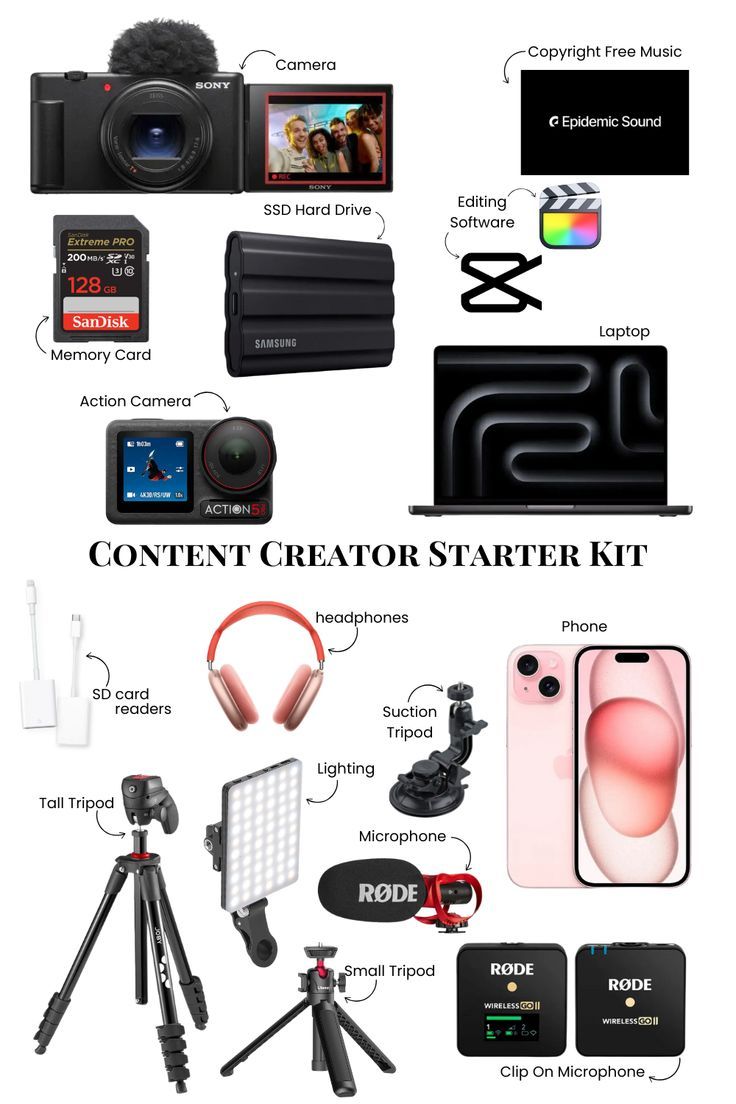
While smartphones can record decent audio, professional podcasts require reliable hardware to ensure high-quality sound and listener retention. Here's your breakdown of recommended tools:
Microphones
A good microphone captures detail and eliminates background noise.
|
Model |
Type |
Ideal For |
|
|
Dynamic |
Solo and remote podcasting |
||
|
Condenser |
Beginners & desktop setups |
Audio Interfaces
If using an XLR mic, you’ll need an interface to connect to your laptop.
|
Model |
Features |
|
|
2 inputs, USB-C, great sound quality |
||
|
Digital interface + control dial |
Headphones
For monitoring, editing, and avoiding mic bleed.
|
Model |
Features |
|
|
Flat sound, durable, closed-back |
Camera (Optional but Recommended)
Especially for podcasts with a YouTube presence or social media reels.
|
Model |
Description |
|
|
Compact mirrorless with mic input |
||
|
4K webcam with auto light correction |
3. Recording and Editing Software
In 2025, even editing software will become more intuitive. You can now delete filler words, clean up background noise, and rearrange segments with near-zero learning curves.
Recommended Platforms:
|
Software |
Description |
|
Edit audio like a document. Automatic transcription, filler word removal, and video editing. |
|
|
Remote podcasting in full HD, includes live audience interaction tools. |
|
|
Smart enhancement tools, AI voice leveling, and noise reduction. |
|
|
Free open-source editor. Great for budget users. |
4. Hosting and Distribution (with Interactive Features)
Podcast platforms now let you publish more than just audio. The best ones support:
- Chapters and timestamps
- Listener polls
- Embedded links
- Q&A sessions
- Video and audiograms
Top Platforms in 2025:
|
Platform |
Key Interactive Features |
|
Embedded Q&A, polls, chapter markers |
|
|
Live audio streams, listener call-ins, monetization |
|
|
Dynamic show notes, CTA buttons, detailed analytics |
|
|
Combine newsletters and podcasting, reader/listener comments |
5. Promoting Your Interactive Podcast
Once your episodes are live, it’s time to promote and build a community. Engagement is key to long-term success.
Strategies:
- Audiograms & Video Clips: Use Headliner or Canva to create short social media visuals.
- Post-Publication Engagement: Use embedded polls or Q&As in Spotify to follow up with listeners.
- Email Newsletters: Pair your podcast with Substack or Beehiiv to build a mailing list.
- Community Building: Launch a Discord server, Telegram channel, or Patreon community for deeper engagement.
6. Monetization Options (2025)
Interactive podcasts have more earning potential through:
- Live Donations (Podbean, Twitch, Ko-fi)
- Premium Episodes or Early Access (Spotify, Patreon)
- Dynamic Ads and Affiliate Marketing
- Merch Integration via podcast pages or social bios
Use tools like Supercast or Patreon to gate premium content and reward loyal fans.
7. Final Checklist Before Launch
- [ ] Chosen a niche and format
- [ ] Written a show description and created cover art
- [ ] Secured hosting and gear
- [ ] Recorded and edited a trailer + 2–3 launch episodes
- [ ] Designed an interactive content plan (polls, feedback loops, visuals)
- [ ] Launched your podcast with a social media teaser
- [ ] Submitted to directories (Apple, Spotify, Google, etc.)
What Makes a Podcast “Interactive” in 2025?
The core of interactive podcasting is responsiveness—how you build conversations with your audience. Whether it's weaving in listener stories, adjusting your episodes based on feedback, or letting your fans steer future episodes, 2025's podcasting landscape is about connection.